
UI UX design has become one of the most in-demand digital skills in India. Startups, IT companies, and global clients are constantly looking for designers who can create simple, user-friendly digital products.
If you are a student, fresher, or career switcher wondering how to learn UI UX design step by step, this guide will help you understand the complete journey from scratch.
This blog explains the UI UX design process in clear steps, without technical confusion, and shows how platforms like HelloGrowing can guide you in learning it practically.
UI UX design, UI UX design step by step, learn UI UX design, UI UX for beginners, UX design process, UI design basics, Figma for beginners, design career in India, digital skills India
Table of Contents
What Is UI UX Design
UI UX design is the process of designing digital products like websites, mobile apps, and software in a way that is easy to use and visually appealing.
- UX (User Experience) focuses on how users feel while using a product
- UI (User Interface) focuses on how the product looks and interacts visually
A good UI UX designer makes sure users can complete tasks smoothly without confusion.
Difference Between UI and UX
| UI Design | UX Design |
|---|---|
| Focuses on visuals | Focuses on user experience |
| Colors, buttons, typography | Research, flow, usability |
| How the product looks | How the product works |
| Tools like Figma, Sketch | Research tools, testing |
Most companies expect designers to understand both UI and UX, especially at beginner and mid-level roles.
Why Learn UI UX Design in India
UI UX design is popular in India because:
- No specific degree is required
- High demand in startups and IT companies
- Freelancing and remote job opportunities
- Creative + logical career option
- Salary growth is strong with experience
According to industry reports, UI UX designers in India can start with ₹4–6 LPA and grow much higher with strong portfolios.
UI UX Design Step by Step Process
Now let’s understand the UI UX design step by step process used by professionals.
Step 1: Understand Users and Problems
Every design starts with understanding the user.
You must ask:
- Who are the users?
- What problem are they facing?
- Why are they using the product?
This mindset is more important than learning tools.
Step 2: Learn UX Research Basics
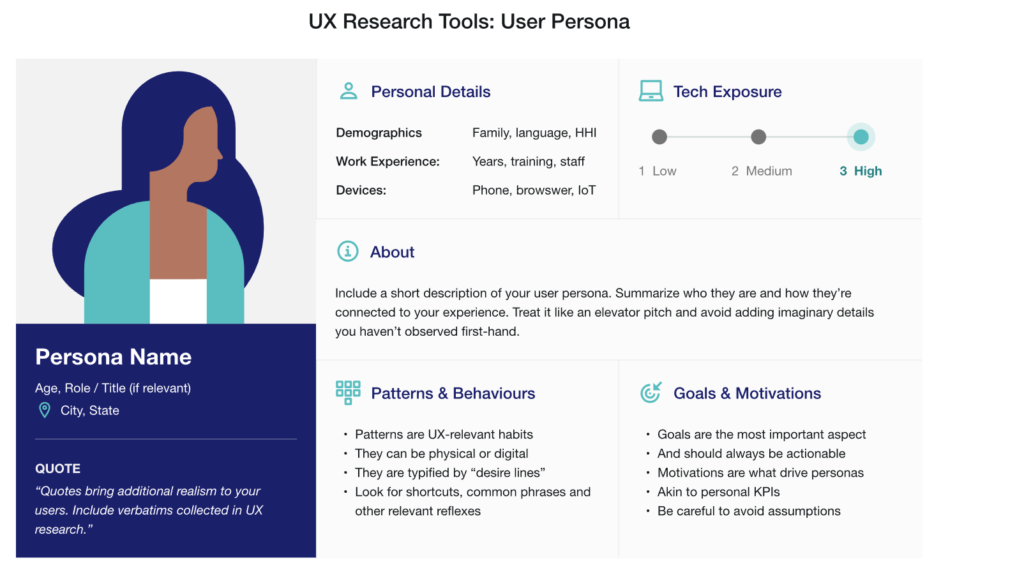
UX research helps you make design decisions based on real user needs.
Common research methods:
- User interviews
- Online surveys
- Competitor analysis
- Reviewing existing apps
You don’t need advanced tools at the beginning. Even simple Google Forms and observations work well.
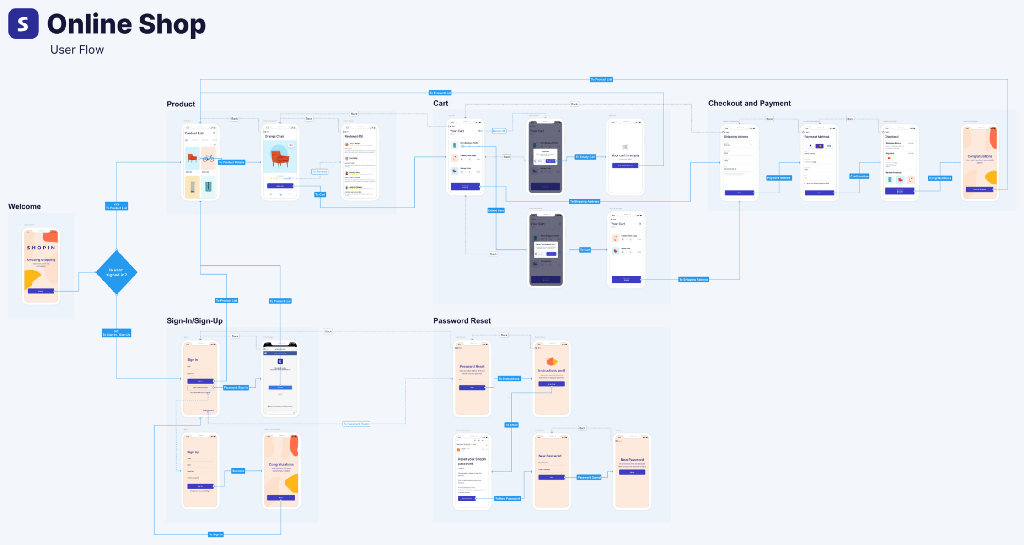
Step 3: Information Architecture and User Flow
This step decides how information is structured.
You plan:
- App or website pages
- Navigation structure
- User journey from start to finish
User flow answers:
“How does a user move from point A to point B?”
Step 4: Wireframing
Wireframes are rough layouts of screens without colors or graphics.
They help you:
- Focus on structure
- Place elements logically
- Save time before visual design
Tools used:
- Figma
- Balsamiq
- Pen and paper (yes, it works)
Figma is the most widely used UI UX design tool today, especially for beginners.
Best for learning:
- Wireframing
- Prototyping
- UI design workflows
Ideal to link when discussing wireframes, mockups, and prototypes.
Step 5: Visual UI Design
This is where UI design comes in.
You decide:
- Colors
- Fonts
- Button styles
- Spacing and alignment
Good UI design follows consistency and accessibility rules, not just creativity.
Step 6: Prototyping
Prototypes show how screens interact with each other.
They help:
- Demonstrate the product flow
- Test before development
- Present ideas to clients or teams
Most designers use Figma for interactive prototypes.
Step 7: Usability Testing
Testing helps identify problems before launch.
You observe:
- Where users get stuck
- What confuses them
- What feels slow or unclear
Even testing with 5 people can give valuable insights.
Step 8: Design Handoff to Developers
Once the design is final, you share:
- Design files
- Spacing and colors
- Assets and icons
Good communication with developers is an important UI UX skill.
Step 9: Build a UI UX Portfolio
Your portfolio matters more than certificates.
Include:
- 3–5 case studies
- Problem, process, and solution
- Wireframes, UI screens, and results
Many beginners create redesign projects for existing apps to build portfolios.
Step 10: Start Freelancing or Apply for Jobs
After learning UI UX design step by step, you can:
- Apply for internships
- Look for junior UI UX roles
- Start freelancing on platforms like Upwork and Fiverr
Consistency and practice matter more than speed.
How to Learn UI UX Design the Right Way
Many beginners struggle because they:
- Only watch random tutorials
- Focus too much on tools
- Skip real projects
A better approach is learning through structured guidance and practical projects.
Platforms like HelloGrowing act as a learning guide by helping learners understand:
- What skills to learn first
- How UI UX design is used in real jobs
- How to build portfolios and career paths
Instead of just theory, the focus stays on job-ready and freelancing skills, which is important for Indian learners.
Final Thoughts
Learning UI UX design step by step is not difficult if you follow the right process and stay patient.
Start with understanding users, move slowly through UX concepts, then focus on UI visuals, and finally build real projects. You don’t need to be perfect on day one.
With consistent practice and proper guidance, UI UX design can become a strong long-term career option in India.
If you treat learning as a journey and not a shortcut, results will follow.

